
What is PDFeXPLODE?
PDF-eXPLODE is a
time-saving tool for people who mail or e-mail large batches of reports
such as invoices, statements, purchase orders and operational
reports. It is a special Windows printer that diverts print
output to e-mail, working seamlessly with your existing applications.
It's so easy to use, you will see results within
minutes of installing it!
Why use PDFeXPLODE?
1.Automate
high-volume document delivery to customers, vendors, employees and
prospects.
2.Batch e-mail invoices, statements, letters and more.
3.Deliver personalized documents securely and reliably.
2.Batch e-mail invoices, statements, letters and more.
3.Deliver personalized documents securely and reliably.
How does PDFeXPLODE work?
PDF-eXPLODE turns
paper and electronic documents - invoices, statements and other reports
and correspondence - into secure e-mails that are sent to customers all
at once. Instead of printing, sorting, stuffing and mailing stacks of
paper, or e-mailing documents one-by-one, PDF-eXPLODE uses the computer
to do the work.
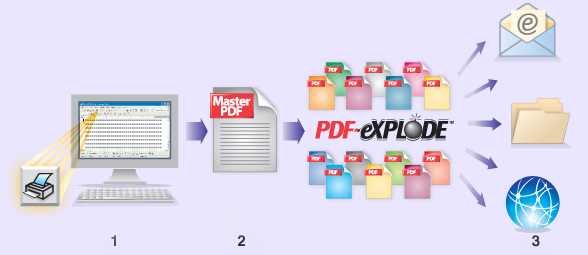
1. Print With the click of
your printer button, PDF-eXPLODE takes a report or a word or mail merge
document and, instead of printing it, converts it to a master PDF
document.
2. Explode Next, PDF-eXPLODE “explodes” (i.e. bursts or splits) the master PDF into individual PDF attachments based on hidden e-mail tags in the original document
3. Deliver Then PDF-eXPLODE distributes each individual PDF either via e-mail, a shared drive on your local area network or FTP (available soon) to the designated recipients
2. Explode Next, PDF-eXPLODE “explodes” (i.e. bursts or splits) the master PDF into individual PDF attachments based on hidden e-mail tags in the original document
3. Deliver Then PDF-eXPLODE distributes each individual PDF either via e-mail, a shared drive on your local area network or FTP (available soon) to the designated recipients
Features of PDFeXPLODE
- Can use with text documents or data-driven reports, seamlessly fitting into your business workflow. PDF-eXPLODE works directly with R&R along with most business applications, including Microsoft Access and Microsoft Word
- Works by reading “tags” easily included in the page header at the start of each section within a document or a report to indicate the e-mail address where the PDF attachment should be sent and the subject/message that should be used
- Preserves the professional appearance of your original documents so the electronic and paper versions look identical. Creates files in Adobe PDF (Portable Document Format).
New
Features added in Version 2
- Mail merge, cover pages and dynamic file naming.
- Multiple output destinations, powerful email addressing and more email options including quick mail.
- Enhanced security and password protection.
New
Features added in Version 3
- New server editions provide enhanced power and scalability allowing multiple users to share a single instance of PDF-eXPLODE.
- HTML format email messages, FAX server support.
- Send email using your choice Outlook (MAPI) or SMTP server.
- Do more with variables and cover sheets.
- New utilities to batch processes and combine and view PDF's.
- New easier to navigate user interface
Version
3 System requirements
PDFeXPLODE Version
3 has the following hardware and software requirements
- Operating
System: Microsoft® Windows XP, Windows 2000, Windows
Server 2003, Windows Server 2008, Windows Vista™ or Windows 7
- Memory:
64MB RAM
- Disk
space: 52.5MB plus extra space for saving files
Pricing
and licensing
You
may download
and install a trial version of
PDF-eXPLODE free for 45 days. At any time before, during or after the
45-day trial, you may purchase
a single-computer license for
$495. An unlock key will be instantly provided, allowing you
to remove the 45-day limitation. Server
licensing is also available.
PDF-eXPLODE is a trademark of 3000AD
Systems.